Migrating to Shopify Plus is no longer just a technical upgrade. For many growing ecommerce brands, it is a strategic move that affects conversion rate, operational efficiency, customer experience, marketing agility, and long-term total cost of ownership. Whether you are moving from Magento, WooCommerce, Salesforce Commerce Cloud, or a custom-built platform, the decision to replatform usually comes after years of workarounds, rising maintenance costs, sluggish site updates, and a growing gap between what your team needs and what your current stack can realistically support.
The good news is that a successful Shopify Plus migration does not need to feel risky or chaotic. With the right planning, a clear migration framework, and the right expectations, brands can move to Shopify Plus with minimal disruption and create a stronger foundation for growth.
This guide walks through the full ecommerce platform migration process, including when it makes sense to migrate, what should be included in your migration scope, how to protect SEO rankings, which integrations matter most, and what a realistic launch plan looks like.
Why brands are migrating to Shopify Plus
There are several reasons ecommerce teams choose Shopify Plus over legacy or highly customized platforms.
The first is speed. Most legacy ecommerce systems are flexible in theory but slow in practice. Simple merchandising updates require developers. Promotions take too long to configure. Launching in new markets becomes a project instead of a workflow. Shopify Plus reduces this friction by giving commerce teams a streamlined admin, a mature ecosystem, and native features that support fast execution.
The second is cost control. A replatform to Shopify often reduces infrastructure and maintenance burdens. Teams that previously spent heavily on hosting, patching, security updates, and plugin management can shift investment toward acquisition, retention, conversion optimization, and product development.
The third is scalability. Shopify Plus supports high-growth brands that need reliable performance during large traffic spikes, flash sales, campaign launches, and international expansion. That reliability matters because platform instability during peak demand creates immediate revenue loss and long-term trust issues.
Another reason is ecosystem maturity. Shopify Plus gives brands access to a large app and partner ecosystem, flexible integrations, B2B capabilities, extensibility through APIs, and a broad talent market. For many organizations, that means less dependence on a narrow set of specialists and a more sustainable operating model.
Finally, user experience matters. Modern ecommerce growth depends on fast page loads, consistent checkout performance, mobile-first journeys, and frictionless merchandising. Shopify Plus gives brands a strong baseline that can be customized without rebuilding core commerce functions from scratch.
Signs you are ready to replatform to Shopify
Not every brand needs to migrate immediately, but there are clear signs that a move is worth evaluating.
One sign is when your team avoids making changes because the platform is too fragile. If launching a new campaign, editing category logic, or changing checkout-related workflows feels risky, your platform is creating drag.
Another is rising developer dependency. If your marketers, merchandisers, and ecommerce managers need engineering support for routine tasks, your platform is not aligned with the pace of modern commerce.
A third sign is a ballooning cost structure. Many brands underestimate the true cost of legacy platforms because they look only at licensing or hosting. When you include maintenance, emergency fixes, plugin conflicts, security updates, and delayed launches, the total cost can be far higher than expected.
You may also be ready for a Shopify Plus migration if your current site struggles with performance, fails during peak periods, limits international expansion, or makes integrations unusually difficult. These issues often compound over time and become expensive to ignore.
What is included in a Shopify Plus migration
A proper Shopify Plus migration is much more than copying products and publishing a new theme. It usually includes several workstreams that must be coordinated carefully.
The first is discovery and planning. This stage covers business goals, stakeholder alignment, technical architecture, store structure, feature parity decisions, and migration priorities. It is where you decide what to keep, what to improve, and what to leave behind.
The second is data migration. This typically includes products, collections, customers, order history, gift cards, discount logic, blog content, pages, media, reviews, subscriptions, and sometimes B2B data structures. Data quality matters as much as data transfer. Cleaning outdated or inconsistent data before migration reduces downstream problems.
The third is design and front-end implementation. Some brands re-create their existing experience on Shopify Plus. Others use the migration as an opportunity to improve UX, simplify navigation, optimize mobile conversion, and modernize brand presentation.
The fourth is systems integration. Ecommerce rarely operates in isolation. Your Shopify Plus setup may need to connect with ERP, CRM, WMS, PIM, subscription tools, loyalty tools, search and merchandising platforms, tax engines, customer service tools, and analytics stacks.
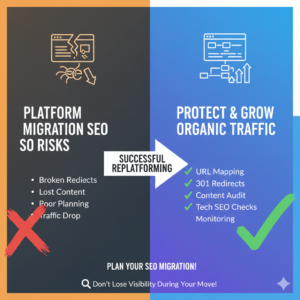
The fifth is SEO migration. Organic visibility can be damaged if URL structures change without planning, redirects are incomplete, metadata is lost, internal links break, or content is mishandled. SEO should be part of migration planning from day one, not an afterthought before launch.
The sixth is QA and launch readiness. This includes functional testing, payment validation, shipping rule checks, tax validation, responsive testing, redirect testing, analytics verification, checkout testing, and content review.
Platform-specific migration considerations
Different source platforms come with different migration challenges.
A Magento to Shopify Plus migration often involves rationalizing complexity. Magento stores tend to accumulate custom modules, layered pricing rules, and heavy technical debt over time. The migration is a chance to simplify where possible and rebuild only the features that truly drive business value.
A WooCommerce to Shopify migration usually centers around stability, app sprawl, plugin maintenance, and performance. WooCommerce can be effective for smaller teams, but fast-growing brands often hit limits related to scalability, security overhead, and plugin conflicts.
An SFCC to Shopify migration usually requires careful handling of enterprise workflows, integrations, promotions, and multi-market structures. Teams moving from Salesforce Commerce Cloud may be seeking faster iteration, a more accessible operating model, and lower dependency on specialist resources.
For custom-built platforms, the biggest challenge is separating necessary business logic from historical customizations. Custom commerce stacks often include years of one-off solutions. A replatform project should identify what is strategically important and avoid rebuilding legacy complexity without strong justification.
How to create a smart migration plan
The best Shopify migration checklist starts with business priorities, not just technical requirements.
Begin by defining why you are migrating. Are you trying to reduce cost, improve speed to market, increase conversion rate, support international expansion, or enable B2B commerce? Those goals should shape scope and timeline.
Next, audit your current environment. Document all storefront features, integrations, customer-facing workflows, back-office dependencies, content types, SEO assets, and reporting requirements. You cannot migrate well if you do not fully understand the current state.
Then prioritize features by value. Many replatform projects stall because teams try to preserve every historical behavior. Instead, classify features into must-have, should-have, and can-be-improved-later categories. This helps prevent unnecessary rebuilds and protects timelines.
You should also establish ownership early. Decide who owns content, design, SEO, integrations, QA, data validation, analytics, and sign-off. Cross-functional alignment reduces launch risk.
Finally, plan for testing and stabilization. A migration is not complete when the site is published. It is complete when the new platform works reliably across real customer journeys, internal workflows, and business reporting.
Protecting SEO during the migration
SEO is one of the biggest concerns in any ecommerce platform migration, and for good reason. Even technically sound launches can cause traffic drops if search considerations are ignored.
Start with a full URL inventory. Map all existing indexable pages and determine what happens to each one after migration. Important pages should either remain equivalent or redirect cleanly to the most relevant destination.
Preserve critical on-page elements such as title tags, meta descriptions, headings, copy, canonical logic, structured data, and image alt text where possible. Review internal linking carefully, especially from high-authority pages.
Create and test 301 redirects before launch. Broken redirects, redirect chains, and homepage redirects are common migration mistakes that waste link equity and hurt user experience.
You should also verify robots directives, XML sitemaps, canonical tags, noindex logic, and analytics tracking before launch. Once the site goes live, monitor crawl errors, indexation, rankings, and organic landing page performance closely.
The key point is simple: protecting SEO rankings during a platform migration requires preparation, not hope.
Common migration mistakes to avoid
One of the most common mistakes is treating migration as a data transfer project instead of a business transformation project. The store may launch, but if operations, marketing, and customer experience are not considered, the outcome will still disappoint.
Another common mistake is overcommitting to feature parity. Not every legacy feature deserves to survive the move. Some represent outdated processes that should be retired.
A third is underestimating integrations. A storefront may look complete while critical backend workflows fail silently. Inventory sync, order routing, tax handling, customer tagging, and ERP sync all need careful validation.
Poor stakeholder alignment is another risk. If decision-makers disagree on goals, scope creep follows. That delays launch and increases cost.
Finally, skipping rigorous QA is costly. Launching without testing checkout flows, discount logic, shipping thresholds, mobile layouts, redirects, and analytics can turn launch week into damage control.
What a realistic timeline looks like
Shopify Plus migration timelines vary based on catalog complexity, integration depth, market count, design requirements, and stakeholder responsiveness.
A relatively focused migration can sometimes launch in a matter of weeks, especially when the brand simplifies scope and uses proven patterns. More complex replatform projects may take several months, particularly when they include custom integrations, multi-region architecture, subscriptions, B2B requirements, or a major UX redesign.
The most important factor is not speed alone. It is controlled execution. A fast launch is valuable only if the store is stable, measured, and ready for growth.
Measuring success after launch
A successful migration should be measured against business outcomes, not just go-live status.
Track conversion rate, average order value, site speed, bounce rate, checkout completion, organic traffic, revenue by channel, operational efficiency, merchandising speed, and support ticket themes. Compare post-migration performance against pre-launch benchmarks.
You should also gather qualitative feedback from internal teams. Are merchandisers faster? Are marketers more independent? Is the support team handling fewer checkout-related issues? Has the dev team shifted from maintenance to growth work? These operational wins are often where Shopify Plus creates its biggest long-term value.
Final thoughts
Migrating to Shopify Plus is a chance to simplify systems, improve agility, reduce technical burden, and create a better customer experience. The brands that get the most from the move are not the ones that copy every detail from the old platform. They are the ones that use replatforming as an opportunity to rethink what modern commerce should look like.
Whether you are planning a Magento to Shopify Plus migration, moving from WooCommerce to Shopify, evaluating an SFCC to Shopify transition, or leaving behind a custom-built stack, the core principle stays the same: migrate with intention.
A strong Shopify Plus migration combines business clarity, clean data, careful SEO handling, reliable integrations, and disciplined testing. Get those pieces right and your new platform becomes more than a replacement. It becomes a growth engine.